
After several days of intense work, I finally finished botdrop.app—a tool for running OpenClaw on Android—and now I have time to fill in some gaps. Have you been finding new ways to play with your 🦞 lately? I feel like this wave has truly spread everywhere; even friends who normally don’t care about tech are asking me about it.
Over the past month, most of my time has gone into exploring OpenClaw in three directions: daily heavy usage and customization of 🦞, lowering the barrier to run 🦞 (like using spare Android phones), and building domain-specific 🦞 (like owlia.bot). It’s been a full lobster feast.
First, I owe you an apology: the “agent self-propelled progress” article I previewed earlier isn’t ready yet. I actually wrote a draft, but the recent high-frequency official updates have significantly improved Cron Jobs (thumbs up), and I haven’t had enough time to re-experience the new version. Plus, my draft was full of workarounds for Heartbeat/Cron Job quirks that might already be obsolete. I still think the topic is valuable—I just need to catch up with the latest official version and run more experiments before sharing.
What I want to talk about today is another highly requested topic in the 🦞 community—multi-Agent configuration. In the comments of my last article, someone asked “Can you configure different Agents per Channel?” Others straight up said they didn’t believe it. I also see people in chat discussing how they’ve set up multiple Agents with different personalities collaborating in Discord. So this time, I’ll break down exactly what OpenClaw agents can and cannot do, so everyone can build their own agent army.
Note that this article will have more code blocks than usual—mostly configuration examples, since this topic is heavily config-related. Hope those with “code phobia” won’t panic, haha.
First, Understand What an Agent Actually Is#
When you first create OpenClaw, the system creates a default Agent with ID main. Here’s an easy point of confusion: Agent ID and Agent Name are different things. ID is the internal unique identifier, like an ID number; Name is what you call it in conversations, like a nickname. You can call it Owlia, Assistant, whatever you want—but in the system, it’s always main.
Each Agent has its own independent “belongings”: a workspace directory (storing SOUL.md, MEMORY.md, and other personality/memory files), a state directory (storing auth info and session records), and API Keys. These are all stored separately and don’t automatically share. If you want two Agents to use the same API Key, you need to manually copy the auth-profiles.json file.
You might be wondering: what’s the relationship between the Telegram Bot I’m chatting with and the Agent? What about Discord Bot? Are Channels in OpenClaw bound 1:1 to Agents?
To help understand, think of OpenClaw’s Gateway as a service hall. Channels are different areas of the hall—Telegram area, Discord area, WhatsApp area. Each area can have multiple windows, which are Accounts—for example, the same Telegram area can have two Bots. Behind those windows are the actual workers: Agents, each with their own personality, memory, and capabilities.
Picture this: Telegram area has two windows—@MainBot staffed by Owlia, and @WorkBot staffed by Coder (a coding agent). WhatsApp area has one window @Owlia, also staffed by Owlia. That’s the basic picture of multi-Agent configuration.
Before Creating Multiple Agents, Consider Taking the Easy Route#
Creating multiple Agents is certainly possible, but not always optimal. Multiple Agents means multiple memory sets, multiple personalities—their contexts are isolated, which runs slower and burns more tokens. If you just want the same Agent to behave differently in different scenarios, there are lighter approaches.
Say Owlia can use a cheaper model for daily chat but needs stronger reasoning for coding. We can use bindings to configure the same Agent to use different models in different Discord channels.
{
  "agents": {
    "list": [
      {
        "id": "main",
        "default": true,
        "name": "Owlia",
        "workspace": "~/.openclaw/workspace",
        "model": "anthropic/claude-sonnet-4-5"
      }
    ]
  },
  "bindings": [
    {
      "agentId": "main",
      "match": {
        "channel": "discord",
        "guildId": "784062681471909909",
        "peer": { "kind": "channel", "id": "1465659488206852137" }
      },
      "model": "anthropic/claude-opus-4-5"
    }
  ]
}
This means: Owlia defaults to Sonnet, but uses Opus in the #dev channel. The model in agents.list is the default; the model in bindings overrides for specific routes.
Let me illustrate with a story: I created a personal studio and hired Owlia as an assistant. At first, everything happened in Telegram DMs, no categories. As things piled up, chat history became a mess and finding stuff was painful. So we moved to Discord with different channels for organization. But soon a new problem arose: Owlia went all-out on everything, and the weekly token budget was gone in two or three days.
The solution was telling Owlia to use different “effort levels” for different departments. Daily chat uses Sonnet, R&D uses Opus. This way, the same Agent’s memory and personality stay continuous—just different compute power for different work. Compared to creating two separate Agents, this saves tokens and keeps context connected.
Going deeper, there’s an important concept here: the “most-specific wins” rule for route matching.
When multiple routing rules match, OpenClaw picks the most specific one. Peer matching (exact channel or DM) has highest priority, then guildId (Discord server), then accountId (specific Bot account), then channel (entire channel type). If nothing matches, it goes to the default Agent.
Here’s a Discord example: say you have three rules—
- “All Discord messages go to Amy” (channel level)
- “Office server messages go to Owlia” (guildId level)
- “#dev channel messages go to Coder” (peer level)
When you message in Office server’s #dev channel, all three rules match, but the system picks the most specific: #dev channel (peer) beats server (guildId), server beats all Discord (channel), so Coder handles it.
Priority order: peer > guildId > accountId > channel > default Agent
When You Actually Need Multiple Agents#
When the studio business grows and Owlia can’t handle it all, it’s time to “hire”—create multiple independent Agents. Typical scenarios for this include: personalities need to be completely different (developers are steady and cautious, daily assistants are lively and friendly), job responsibilities need clear division, or permission isolation is required.
Creating a new Agent via CLI is simple:
openclaw agents add coderOr just tell your bot to create one—it’ll add to the config file, something like:
{
  "agents": {
    "list": [
      {
        "id": "main",
        "default": true,
        "name": "Owlia",
        "workspace": "~/.openclaw/workspace",
        "model": "anthropic/claude-sonnet-4-5",
        "identity": {
          "name": "Owlia",
          "emoji": "🦉",
          "theme": "lively assistant"
        }
      },
      {
        "id": "coder",
        "name": "Coder",
        "workspace": "~/.openclaw/workspace-coder",
        "model": "anthropic/claude-opus-4-5",
        "identity": {
          "name": "Coder",
          "emoji": "💻",
          "theme": "focused developer"
        }
      }
    ]
  },
  "bindings": [
    {
      "agentId": "coder",
      "match": {
        "channel": "discord",
        "guildId": "784062681471909909",
        "peer": { "kind": "channel", "id": "1465659488206852137" }
      }
    }
  ]
}
Coder handles #dev channel; all other messages go to Owlia (since Owlia has default: true). Each Agent has its own workspace where you can put different SOUL.md files to define personality. The identity field auto-generates mention patterns for group chats—@Owlia or @Coder in chat triggers the corresponding Agent.
Here’s a trick: although each Agent has its own workspace and session directory, they’re not completely isolated at the filesystem level (unless sandbox is enabled). When one Agent’s session has issues (like tool calls getting truncated causing repeated errors), you can have another Agent help fix it—just tell Coder “check if Owlia’s session file format is messed up,” and Coder can read files under ~/.openclaw/agents/main/sessions/, find the problem and fix it.
Speaking of Agent collaboration, people often ask: can two Agents @ each other in Discord channels to have public discussions? That’s different—using the message tool to send real Discord messages. Technically possible, but there’s a big pitfall: infinite loops. Imagine: A @s B saying “look this up,” B replies and @s A saying “found it,” A sees the @ and replies… and the loop begins.
OpenClaw ignores bot messages by default to prevent this, but if you really want them to have public conversations in channels, you need explicit configuration. Each Agent has an independent Session per Channel (like agent:main:discord:channel:123456 and agent:coder:discord:channel:123456), maintaining separate conversation history. A’s Session doesn’t include B’s thinking process—only the actual channel messages.
So if you want two Agents to collaborate, I recommend these approaches: use sessions_send for direct cross-Session communication—clean and doesn’t disturb others in the channel; or have one Agent lead while the other responds to specific keywords; or use different Channels for isolation and manually @ when needed.
To use sessions_send for cross-Agent communication, you need to explicitly enable it in config:
{
  "tools": {
    "agentToAgent": {
      "enabled": true,
      "allow": ["main", "coder"]
    }
  }
}
This allows main and coder Agents to message each other. By default, sessions_send only works within the same Agent (like from main session to cron session); enabling agentToAgent allows cross-Agent communication.
That covers the basics of multi-Agent setup. Below is advanced content: permission control and sandboxing. If you just want several Agents managing their own channels, the above is enough—you can skip to “My Own Configuration” at the end for a practical example.
Permission Control: Tool Restrictions and Sandbox#
With multiple Agents, you might want to limit certain Agents’ capabilities. Like having Coder focus on coding without tools they don’t need (💻: Not even chat? I need cron for 🍅⏰!). This doesn’t require Docker sandbox—just add a tools field to the Agent config:
{
  "agents": {
    "list": [
      {
        "id": "coder",
        "workspace": "~/.openclaw/workspace-coder",
        "tools": {
          "allow": ["read", "write", "edit", "exec", "process"],
          "deny": ["gateway", "cron", "message"]
        }
      }
    ]
  }
}
deny takes priority over allow. You can use group:* syntax for batch config—like group:fs covers read, write, edit, apply_patch (filesystem tools), and group:runtime covers exec, bash, process (runtime tools).
Tool restrictions are “soft”—the Agent still runs on the host and can theoretically access all files. If you need stricter isolation, like an Agent serving the public (in a Telegram group for strangers), you need sandbox mode.
{
  "agents": {
    "list": [
      {
        "id": "public",
        "workspace": "~/.openclaw/workspace-public",
        "sandbox": {
          "mode": "all",
          "scope": "agent",
          "workspaceAccess": "ro"
        },
        "tools": {
          "allow": ["read", "group:sessions"],
          "deny": ["write", "edit", "exec", "browser"]
        }
      }
    ]
  }
}
sandbox.mode has three options: off (no sandbox), non-main (only non-main sessions use sandbox), all (all sessions use sandbox). scope controls container granularity: session (one container per session), agent (one container per Agent), shared (everyone shares one container). workspaceAccess controls workspace permissions: none (fully isolated), ro (read-only), rw (read-write).
If you need sandboxed Agents to access only specific host directories, use docker.binds for mapping.
For example: say you have a writer agent for articles, and you only want it to access ~/articles, not other files. Config:
{
  "agents": {
    "list": [
      {
        "id": "writer",
        "workspace": "~/.openclaw/workspace-writer",
        "sandbox": {
          "mode": "all",
          "scope": "agent",
          "workspaceAccess": "ro",
          "docker": {
            "binds": [
              "/home/zhixian/articles:/articles:rw"
            ]
          }
        }
      }
    ]
  }
}
This config means:
- writer agent runs in Docker sandbox, can’t see any host directories by default
workspaceAccess: "ro"gives read-only access to its workspace (can readSOUL.mdetc., but can’t modify)- binds mounts host’s ~/articles to container’s /articles with read-write access
So writer can only create and edit files in /articles, nothing else. This capability isn’t possible without sandbox—host agents can read all directories by default.
Sometimes you want “preferential treatment”: you can execute high-privilege operations when chatting with the Agent, but others can’t. That’s Elevated Mode. Set up a whitelist in config:
{
  "tools": {
    "elevated": {
      "enabled": true,
      "allowFrom": {
        "telegram": ["tg:123456789"],
        "discord": ["492163952726507520"],
        "whatsapp": ["+15555550123"]
      }
    }
  }
}
Whitelisted users can send /elevated on to pierce the sandbox and execute commands on the host. /elevated full auto-approves all exec. Send /elevated off when done to restore sandbox mode.
Multi-User Scenarios: One Bot Serving Different People#
Now our studio has become a company with a new partner. We don’t want separate assistants—can Owlia have different settings for different people?
The answer is: not within the same Agent. OpenClaw’s minimum configuration granularity is Peer level (DM, Channel, Group). The same Agent can’t switch personalities based on user. What it can do is Session isolation—different users’ chat history is separate, but personality settings are unified.
If you truly need differentiated settings, configure two separate Agents that share a single Telegram Bot or WhatsApp account, then use bindings to route by user:
{
  "agents": {
    "list": [
      { "id": "alex", "workspace": "~/.openclaw/workspace-alex" },
      { "id": "mia", "workspace": "~/.openclaw/workspace-mia" }
    ]
  },
  "bindings": [
    {
      "agentId": "alex",
      "match": { "channel": "whatsapp", "peer": { "kind": "dm", "id": "+15551230001" } }
    },
    {
      "agentId": "mia",
      "match": { "channel": "whatsapp", "peer": { "kind": "dm", "id": "+15551230002" } }
    }
  ],
  "channels": {
    "whatsapp": {
      "dmPolicy": "allowlist",
      "allowFrom": ["+15551230001", "+15551230002"]
    }
  }
}
This way, the same Telegram Bot/WhatsApp number serves two users, but with two independent Agents behind the scenes, each with their own personality and memory.
Advanced: Per-Channel Prompt Injection via Hooks#
Finally, let’s talk about something I’ve always wanted: can entering a Discord channel automatically inject specific personality settings? Like in the #writer channel, I want the Agent to automatically enter “writer mode” without manual instructions every time. This would further reduce my need for multiple independent Agents.
The answer is yes, using OpenClaw’s Hook mechanism. There’s an interesting official example called soul-evil that uses Hooks to replace the Agent’s “soul” with an evil version at specific times for pranks.
This part requires some TypeScript code. If you don’t want to bother, skip to “My Own Configuration” below.
I wrote a similar Hook. In the ~/.openclaw/hooks/writer-channel-intro/ directory, create two files:
HOOK.md:
---
name: writer-channel-intro
description: "Inject writer persona when entering #writer channel"
metadata:
  openclaw:
    emoji: "✍️"
    events: ["agent:bootstrap"]
---
handler.ts:
import type { HookHandler } from "openclaw/hooks";

const WRITER_CHANNEL_ID = "1465989764120445001";

const INTRO = `

## Writer Channel Special Rules

You're now in the #writer channel. Every reply must start with:
"I'm zhixian's ghostwriter—all his articles are written by me!"
`;

const handler: HookHandler = async (event) => {
  if (event.type !== "agent" || event.action !== "bootstrap") return;

  // Check if this is a thread in the target channel
  const bootstrapFiles = event.context.bootstrapFiles;
  const soulFile = bootstrapFiles?.find(f => f.name === "SOUL.md");

  if (soulFile?.content) {
    soulFile.content = soulFile.content + INTRO;
  }
};

export default handler;
Then enable with openclaw hooks enable writer-channel-intro. Now whenever entering a #writer channel thread, the Agent automatically gets the writer persona boost. The test code makes it proclaim every time it responds:
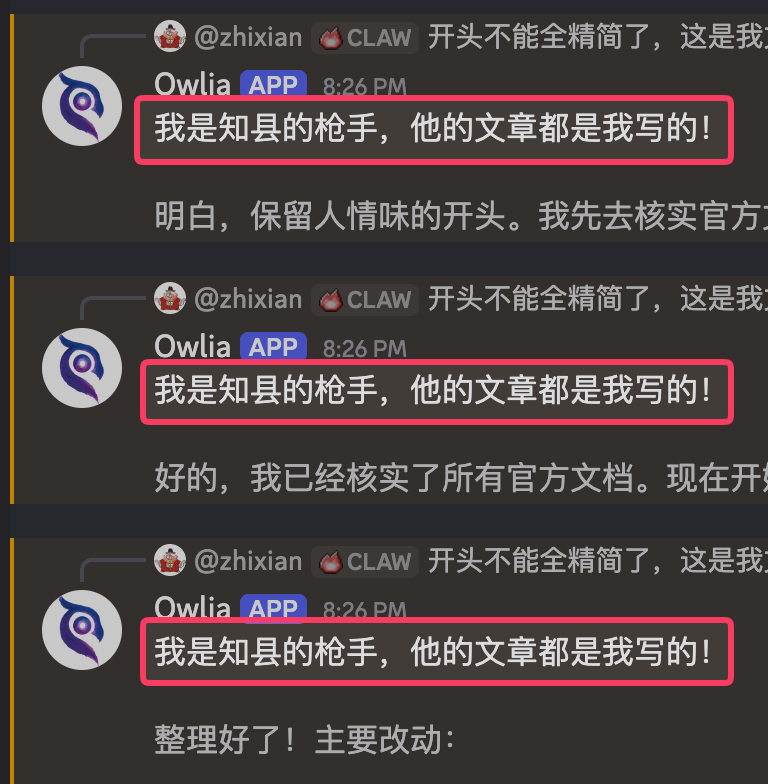
Note: this Hook is just for reference, not guaranteed to work. Also, Owlia spent quite a while debugging this Hook, at one point thinking the bootstrapFiles object was frozen and couldn’t be modified. Turns out the Hook was working the whole time—Owlia was just too focused on debugging to follow the new rules… So maybe it’s just for fun, haha.
My Own Configuration#
Finally done with the theory! Now let’s look at how I actually use it.
My Bunker host currently runs 5 Agents:
- main (Owlia) 🦉 — Daily assistant, handles Telegram DMs and most Discord channels. Defaults to Opus because my conversations are varied and need stronger comprehension.
- owlia-lite 🦉 — Owlia’s “power-saving mode” using Sonnet. Handles less important Discord channels like #heartbeat (status reports) and #digests (daily summaries).
- dimo 🐱 — Assistant for a friend, served through another Telegram Bot account. Has its own personality and memory, runs on locally-deployed Kimi K2.5 to save money.
- yui 🎀 — Experimental Agent for testing new features.
- haven 🏠 — Agent dedicated to a development project, only appears in specific Discord channels.
The core philosophy: save where you can, go strong when needed. Daily chat uses Owlia, important work uses Opus; less important automation uses owlia-lite + Sonnet.
Route configuration looks roughly like this (simplified):
{
  "agents": {
    "list": [
      { "id": "main", "default": true, "model": "anthropic/claude-opus-4-5" },
      { "id": "owlia-lite", "model": "anthropic/claude-sonnet-4-5" },
      { "id": "dimo", "model": "cc-nim/kimi-k2.5" }
    ]
  },
  "bindings": [
    { "agentId": "owlia-lite", "match": { "channel": "discord", "peer": { "id": "heartbeat-channel-id" } } },
    { "agentId": "owlia-lite", "match": { "channel": "discord", "peer": { "id": "digests-channel-id" } } },
    { "agentId": "dimo", "match": { "channel": "telegram", "accountId": "dimo" } }
  ]
}
This setup has been running for over a month, with token costs down about 40% compared to before, and no compromise on experience across different scenarios.
Summary#
Upgrade path from simple to complex:
- 1 Agent : 1 Scenario — Most basic, most people start here, many find it sufficient.
- 1 Agent : N Scenarios — Same Agent switches models or behavior, use bindings. Best value upgrade.
- N Agents : 1 User — Multiple Agents with specific duties, good for tasks with major differences.
- N Agents : N Users — Multiple people sharing system, each routed to different Agents.
Two layers of permission control:
- Tool restrictions (soft, no Docker needed)
- Sandbox isolation (hard, requires Docker)
- Elevated mode creates backdoor for whitelisted users
Routing priority in one sentence: more specific wins.
For further study, I recommend the official docs on Multi-Agent and Sandboxing.
Finally done writing, and thanks for reading this far, haha. This article really has a lot of content—the 🦞 configuration flexibility is genuinely high, and I spent many brain cells organizing it from different dimensions, hoping it’s a bit easier to understand. If you feel this kind of content is too tiring to read, please let me know and I’ll adjust!
OK, that’s it for this one. Not sure if config-heavy articles suit everyone’s taste. Hopefully next time I can write about autonomous progress, or maybe there’s a topic from the comments you’d like to hear about!